Guides
Browser Games vs Downloaded Games: Why Play Online Without Installing
Why play free browser games: no download or storage, instant play on any device, automatic updates and safer play, plus tips for smooth play.
By GamesYap Team6 min read
A few years ago, good games meant big downloads. Today, HTML5 browser games run straight from a web page with smooth graphics, sound and touch controls. Here is why more players choose to play in the browser — and how to get the best experience.
How browser games actually work
When you open a browser game, your browser downloads the game's files — code, images and sounds — much like it loads any web page. The game then runs inside the page using standard web technology: HTML5 for the page, JavaScript for the game logic and the canvas element for the graphics. Many games draw their art directly in code, which keeps the files small.
Because these are open web standards, the same game file runs in any modern browser on phones, tablets and computers. Nothing is installed on your device: when you close the tab, the game is gone, apart from small saved data such as your progress and settings.
1. No download, no storage
Browser games load in seconds and take no space on your phone. You never have to delete photos to make room for a game you might play only once.
2. Play on any device
The same game works on a phone, a tablet, a laptop or a desktop computer. Start on your phone on the bus and continue on your computer at home — with a free account, your progress follows you.
3. Always up to date
There is nothing to update. When a game gets new levels or fixes, you simply get the newest version the next time you open it.
4. Safer by design
Browser games run inside the browser's protective sandbox and cannot install anything on your device. Stick to trusted sites, and you avoid the risks of downloading unknown apps.
A few warning signs are worth knowing. A site that asks you to download a file, install a browser extension or "update your player" before you can play is not offering a normal browser game. Real HTML5 games just start when you press Play.
5. Try many games quickly
Because there is no installation, you can try a puzzle, a racing game and a card game in a few minutes and keep only the ones you love as favorites.
Browser games vs downloaded games at a glance
| Browser games | Downloaded games | |
|---|---|---|
| Getting started | Open a page and press Play | Find, download and install first |
| Storage | Almost none | Often hundreds of megabytes or more |
| Updates | Automatic on the next visit | Downloaded separately |
| Devices | Any modern browser | Usually one platform per download |
| Offline play | Needs a connection to load | Often works fully offline |
| Best for | Quick sessions and trying new games | Very large games you play every day |
Neither option is "better" in every case. Browser games win when you want to play right now, on whatever device is in your hand.
When an app still makes sense
Apps live on your home screen and open with one tap. GamesYap has both: you can play in the browser, add the website to your home screen from your browser menu, or use the GamesYap apps — with the same account and points.
Either way, games on GamesYap need an internet connection, because our servers check every result. If the connection drops, the game pauses and carries on once you are back online.
How saving works in the browser
A common worry is losing progress. On GamesYap, games save on your device, so you can close the tab and carry on later in the same browser. With a free account, your cloud saves, favorites and recently played games are kept on every device you sign in on. If you clear your browser data without an account, progress stored only on that device can be lost, so signing in is the safer choice for long journeys and level packs.
Tips for the smoothest play
- Keep your browser updated. Newer browsers run games faster.
- Close other heavy tabs on older phones.
- Use full screen. On phones, games open full screen; turn your device if the game asks.
- Use a stable connection for the first load. After loading, most games need very little data.
- Refresh if something looks wrong. If a game won't load, refresh the page, check your connection and make sure your browser is up to date. On GamesYap you can also use Report a problem on the game's page.
Start playing
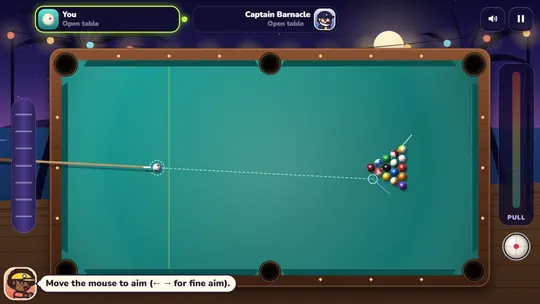
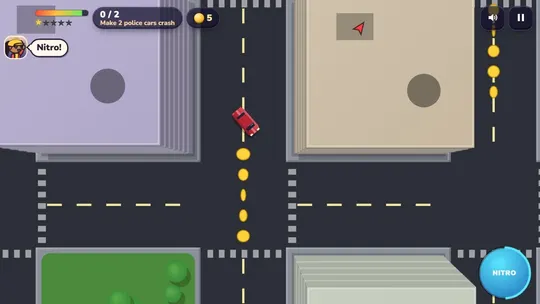
Try a few free browser games on GamesYap: shoot 8-ball pool in Cue Lagoon, solve the daily word in Word Orchard or outrun the sirens in Siren Sprint — all instantly, no download.
Each one shows what modern browser games can do. Cue Lagoon has real ball physics with spin and a guide line, and the table turns to fit a phone held upright or sideways. Word Orchard packs three word games into one page: the Daily Word, the Word Wheel and Word Search. Siren Sprint is a police chase car game where your car drives itself, buildings rise in 3D as you pass, and you steer with two buttons or the arrow keys.
If you mostly play on a phone, our guide to HTML5 games for mobile has more picks that work well with touch controls.
FAQ
Are browser games safe?
Browser games from trusted sites are safe: they run inside the browser's sandbox and cannot install software on your device. Avoid sites that ask you to download files, install an extension or update a player before you can play. A normal HTML5 game simply starts when you press Play.
Do browser games work on phones?
Yes. Modern HTML5 games work in phone browsers with touch controls, and many open full screen. GamesYap games are designed for phones, tablets and computers, and on phones they open full screen. If a game works best sideways, it will ask you to turn your device.
Do browser games use a lot of data?
Most browser games download a few megabytes on first load and very little after that, which is usually less than downloading an app. A stable connection helps for that first load. After that, short sessions use little data, though games that save to the cloud still send small updates.
Can I save my progress in browser games?
Yes. On GamesYap your progress saves on your device, and with a free account it is saved to the cloud so you can continue on another device. Without an account, clearing your browser data can remove progress that was stored only on that device.
Can I play browser games without an internet connection?
A browser game needs a connection to load, although many need very little data once they are running. On GamesYap, games need the internet the whole time, in the browser and in the apps, because our servers check every result before it counts. If the connection drops, the game pauses until it is back.