Guides
Games iPhone and Android Can Play Together: 4 Free Browser Games Where One Link Puts Everyone in the Same Room
Free games iPhone and Android friends can play together in the browser. Send one link and everyone joins the same room. No app store, no download.
 By Mahedi Hasan7 min read

The easiest games iPhone and Android friends can play together are browser games with online rooms. One person creates a room, sends the link, and everyone opens it in Safari or Chrome. There's no app store, no matching versions and no cross-play setting to find. On GamesYap, four games work this way: Snake Ludu (snakes and ladders, rooms for up to 10), Serpent Arena 3D (a snake arena, rooms for up to 20), Willow Smash (cricket for 2 to 4) and Shamble Siege (zombie co-op for 3). They're all free.
Here's what to do. Pick the game that fits your group below, create a room, and paste the link into your group chat. Friends on an iPhone, an Android phone, an iPad or a laptop tap it and land in the same lobby. Nobody needs an account to join.
Why the browser fixes the iPhone-and-Android problem
When a group of friends tries to play an app game together, the same three things go wrong. The game is on one store but not the other, or one phone is a version behind, or cross-play is a setting somebody has to switch on and nobody can find. A browser game skips all three. It's the same page on every phone, it's always the newest version, and there's no store in the middle.
The catch is that you need a connection the whole time. Our games are online-only, so they won't work in airplane mode. On a decent mobile connection, though, a room works fine with a mix of phones.
The four games, and which group each one suits
| Game | What it is | Players per room | How friends join |
|---|---|---|---|
| Snake Ludu | Snakes and ladders in 3D | Up to 10 | Invite link, join request or QR code |
| Serpent Arena 3D | Real-time snake arena | Up to 20 | Six-letter code or invite link |
| Willow Smash | Cricket batting, same balls for everyone | 2 to 4 | Link or six-character code |
| Shamble Siege | Zombie shooter, co-op | Up to 3 | Link, code or the open-rooms list |
Snake Ludu: the family group chat game
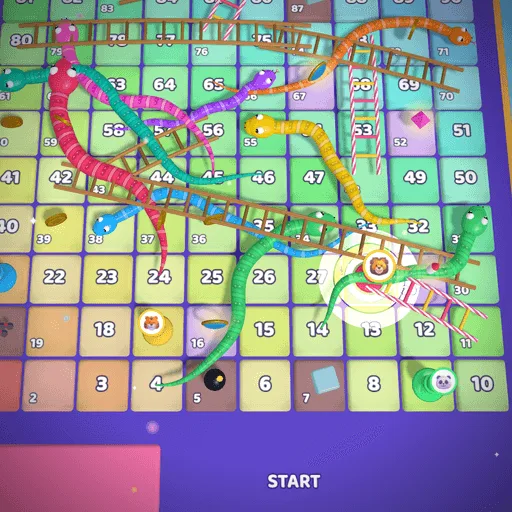
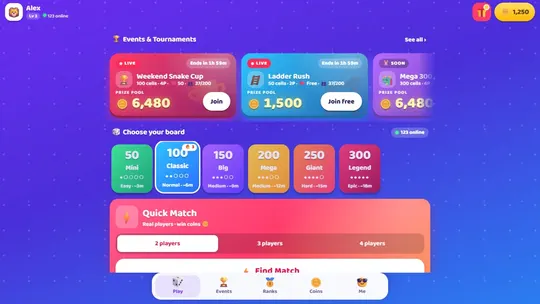
Snake Ludu is snakes and ladders on a colorful 3D board, and it's the one we'd send to a family group. Grandparents on an Android phone and kids on an iPad can play the same match. Open a Private Room, share the invite link or show the QR code, and accept join requests as they come in. Rooms hold up to 10 people. You pick a board from the quick 50-cell Mini to the 300-cell Legend. The dice are rolled on the game's server, so nobody can claim the other phone cheated.
During a match you can throw tomatoes and eggs at the other players and send emoji and quick chats. That's a lot more fun than texting "your turn" for twenty minutes.
Serpent Arena 3D: the big group
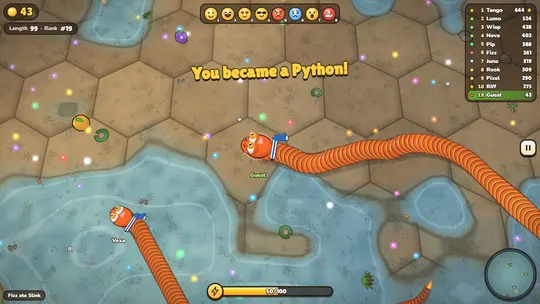
Serpent Arena 3D handles the biggest rooms. Its Private room holds up to 20 friends. The host picks Classic, Team Battle, Battle Royale or Time Rush, and bots fill the empty space, so even three people get a busy arena. You steer with a touch joystick on a phone or with the mouse on a laptop, so the friend on a computer and the friend on a phone play the same match. Kills and scores are decided by the game server, not by anyone's phone. Our snake .io guide explains how to win a fight.
Willow Smash: a fair five-minute contest
Willow Smash is cricket batting, and its rooms are built for a fair fight. Up to four players bat the same balls at the same time: same bowler, same swing, same yorker. Tap Friend match, pick the overs and wickets, share the link and start when everyone's in. At the end, one board shows each player's runs, wickets and balls, and a score card picture you can share to the chat settles any argument.
Shamble Siege: three friends against a horde
Shamble Siege is the co-op pick. In Co-op Online, up to three heroes share one horde that starts at 50 zombies and grows every stage, with a boss every fifth stage. Rooms can be friends-only or open, and friends join by link or six-character code. After each stage, a board shows who came first, second and third. Our zombie co-op guide covers weapons and roles.

Tips for a smooth room with mixed phones
- Send the link, not the game name. A link drops friends straight into your room. If you tell them a name, they'll end up in a public lobby.
- Add it to the home screen. In Safari, use Share and then Add to Home Screen. In Chrome on Android, use the menu and pick Add to Home screen. The game then opens full screen like an app, which helps on small phones.
- Turn off Low Power Mode. On an iPhone it can lower the frame rate in the browser. Battery saver on Android can do the same.
- Keep everyone on the same network type if you can. Wi-Fi plus one friend on weak mobile data works, but that friend sees the match a little later.
What about app games with cross-play?
Plenty of big app games let iPhone and Android players meet, but read the store page carefully. Cross-play means the two phones can join the same match. Cross-save (or cross-progression) only means your account follows you between devices. A game can have one without the other. Also check whether everyone needs the same account system, the same region and the same version, since that last one breaks game night more often than anything. A browser room avoids all of this, which is why we built ours that way.
For more ways to play together, including two-player games on one phone for friends in the same room, see our list of multiplayer browser games with friends. If you're on an iPhone and just want games without the App Store, start with free games for iPhone without the App Store. All of these are in our multiplayer games category.
FAQ
Can iPhone and Android users play games together?
Yes. The simplest way is a browser game with online rooms, because both phones open the same web page. In Snake Ludu, Serpent Arena 3D, Willow Smash and Shamble Siege, one player creates a room and shares the link. Friends on iPhone, Android, iPad or a computer tap it and join the same match, with nothing to install.
Do my friends need to download anything or make an account?
No. They open the link in Safari, Chrome or any modern browser and join as a guest. Signing in to GamesYap is optional. It saves your progress and points across devices, and it puts your name on the results board instead of a guest name. Serpent Arena accounts are for players aged 13 and over.
Can we play offline or in airplane mode?
No. All four games need an internet connection the whole time, because the rooms run on our game servers and the server decides the dice, kills and scores. That's also what keeps matches fair between different phones. For a flight or a long drive with no signal, pick a game app that clearly says it works offline.
Which game is best for a big group?
Serpent Arena 3D, with private rooms for up to 20 players. Bots fill the empty space, so the arena stays busy with any number of friends. For a family group that wants something calmer, Snake Ludu rooms hold up to 10 players. Turns are short, and the server's dice keep it fair.
Is there voice chat in the rooms?
No. None of the four games has voice chat. Snake Ludu has emoji, quick chats and things to throw at the other players, and Serpent Arena has quick-chat emotes. Most groups run a voice call in another app alongside the game, which works fine on both iPhone and Android.