

Tips
Idle Server Tycoon Tips: Storage, Rates and Peak Sales
Idle server tycoon tips for Cloud Garage: which servers to buy first, how big a storage cabinet you need, how to read the rate chart and when to sell.
By GamesYap Team6 min read
Most idle games pay you the moment something is made. A good idle server tycoon adds a choice: your servers make data, but you decide when to sell it. These idle server tycoon tips are built around Cloud Garage, our free server farm game, where one old laptop in a garage grows into a tech park full of racks. Many of the ideas also work in other idle and management games.
In Cloud Garage you play Nabil, a young techie who borrows a corner of his uncle's garage. Mama only asks one thing: don't touch his bicycle. Fatema Apa, a senior engineer, joins once the first rack is in, and Joy, the cheerful intern, carries cables around the farm.
How the farm makes money
There are three steps, and every tip below fits into one of them.
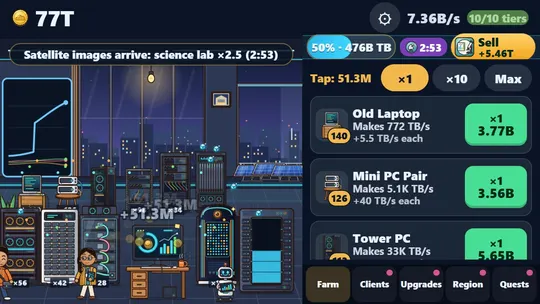
- Servers make data. Every server tier makes a number of terabytes a second, from the old laptop on a crate to the supercomputer.
- Data waits in the storage cabinet. The cabinet holds a few minutes of output. When it is full, your servers stop and wait.
- Clients buy the data. You sell the whole cabinet to one client, and the power bill takes its share of the sale.
At the very start you have no servers, so you tap the console (or anywhere on the farm) to process jobs by hand. Twelve coins buy the first laptop, and from then on the data starts flowing.
Buy order in the first half hour
Each server tier opens after the one before it, and the first unit of a new tier is the big jump. A simple rule works well:
- Buy the next tier as soon as it opens and you can afford it.
- In between, buy more of your newest tier, not your oldest.
- Take each server upgrade when it appears. The first one for a tier comes with the first server, the second at 15 servers, and each doubles that tier's data.
The tower PC is the first goal. It opens video streams, a client that pays much more for every terabyte than the photo cloud. After that come the 1U and 2U racks, the blade chassis, which opens game hosting, then the GPU rack, the storage array and the liquid-cooled rack, which opens the science lab.
Size the storage cabinet
The storage cabinet is the heart of the game. Its glass window in the farm fills up with blue data, turns amber when it is nearly full and red when it is full. A full cabinet is the worst state in the game, because your servers make nothing until you sell.
The cabinet holds a number of seconds of your current output, so it grows with your farm by itself. Upgrades add 90 seconds each. That matters for two reasons:
- Time to wait. A bigger cabinet gives you more minutes to wait for a good rate before it fills up.
- Short breaks. If you look away for a few minutes, a big cabinet keeps the servers running the whole time.
Buy a storage level whenever it costs less than a few minutes of income, and always when you notice the cabinet filling up before a good rate arrives.
Read the rate chart
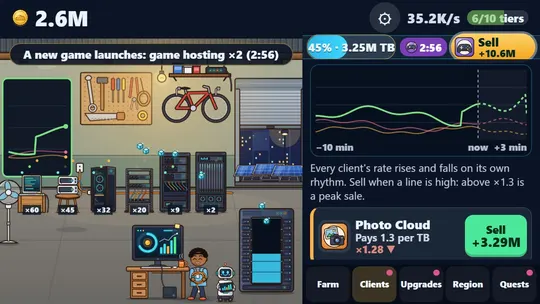
Each client pays a base price per terabyte, and that price rises and falls on its own rhythm, between about half and one and a half times the base. The movement is fixed and the same for every player, so the forecast on the chart is exact, not a guess.
Open the Clients tab to see every open client's line for the last ten minutes, plus a dashed forecast for the next three. A few habits help:
- Sell above ×1.3. The game calls that a peak sale, and the Sell button turns gold when the best client is there.
- Look at the arrow. A ▲ next to a rate means it is still climbing. Waiting a minute can pay noticeably more.
- Don't wait too long. If the cabinet is about to fill, sell now. Waiting with a full cabinet loses more than a slightly lower rate costs.
- Compare clients, not just one line. The Sell button in the strip always picks the client that pays most right now.
The same chart, smaller, also runs on the rate screen on the farm's back wall, so you can keep an eye on it without leaving the Farm tab.
Use the news
Every few minutes of play, a news line appears at the top of the farm, announced a minute ahead. Some news pushes one client higher: a football final makes video streams pay two and a half times more, satellite images do the same for the science lab, and a big rival's outage lifts every client a little. Other news changes the power bill: cheap night power removes it, while a heatwave doubles it.
News lasts four minutes. If a boost is coming for a client you can sell to, let the cabinet fill a little and sell during the news. If a heatwave is on, sell only what you must, and sell the rest when it ends.
Cut the power bill and hire the bot
At the start, the power bill takes 30% of every sale. Each solar panel cuts it by three points, up to eight panels, so a full set leaves only 6%. Solar panels are worth it once your sales are large, because they make every future sale bigger.
The Sales Bot is the other key buy. It sells a full cabinet by itself at the best rate of that moment, so your servers never sit idle. It also keeps selling while you are away, for up to eight hours. Without the bot, time away only fills the cabinet, and you sell it when you come back. Buy it as soon as you can, usually in the first half hour.
Grow into new regions
Once you build a supercomputer, the Region tab lets you open a farm in a new region. Your servers, upgrades, storage, solar panels, bot and coins start again, but you keep your Uptime Stars, and each star adds 2% to all your data and taps for good. After the first new region the farm moves from the garage into a warehouse, and after the third into a tech park.
A good time to move is when buying the next upgrade would take longer than playing the early game again with your new stars. The first farm in a new region grows much faster, because every server starts with the star bonus.
If you enjoy games like this, also try Market Tower with our idle mall tycoon tips, Bazar Empire with our idle market tycoon tips, or the river port Launch Ghat with our idle boat tycoon tips. You can find more in the idle games and strategy games categories, and signed-in players can read how GamesYap points work.
FAQ
Is Cloud Garage free to play?
Yes. Cloud Garage is free in your web browser on phones, tablets and computers, with nothing to download or buy. Optional ads can give a short boost or a longer forecast, but they never give points.
Do the client rates change by chance?
No. Every rate follows a fixed rhythm that is the same for every player, and the news comes in a fixed order. That is why the forecast on the chart is exact.
What should I buy first?
Buy the old laptop with your first twelve coins, then the next server tier whenever it opens. Take each server upgrade when it appears, and add storage levels so the cabinet never fills before a good rate.
Can I play Cloud Garage with a keyboard?
Yes. Press Space to process a job and S to sell the stored data to the client that pays most right now. Every button can also be reached with the Tab key.
