
Guides
How to Play Cricket With Friends Online: Live Match Rooms Explained
How to play a cricket game with friends online: open a live match room, invite up to three friends with a link or code, bat the same balls and share the result.
 By Mahedi Hasan7 min read
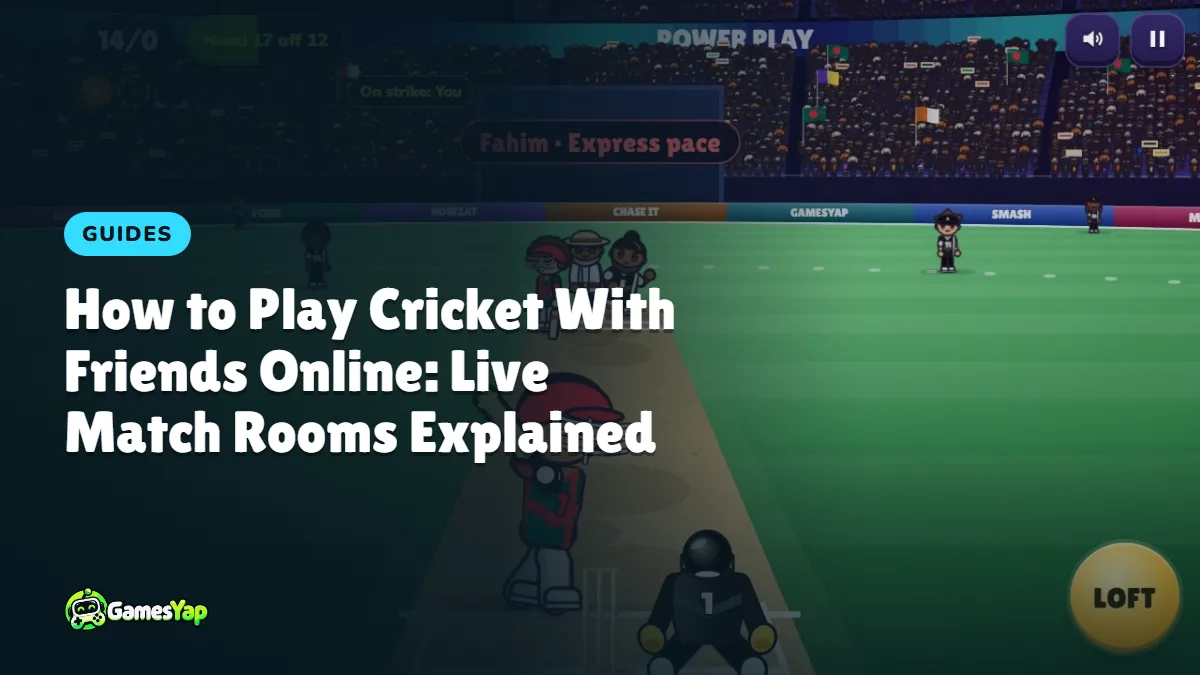
You can play cricket with friends online without anyone installing an app or making an account. In Willow Smash, one player opens a live match room, the others join with a link or a short code, and everyone bats at the same time against the very same bowling. This guide walks through the whole thing, from opening the room to sharing the final score card.
What a live match is
A live match is a batting contest for two to four players. The game's bowlers send every player the same deliveries, in the same order: the same pace, the same swing, the same spin. Nobody bowls and nobody fields, so there is no waiting for a turn. Each player bats their own innings on their own phone, tablet or computer, and the player with the most runs wins.
Because the balls are identical, the result comes down to timing and nerve. If your friend gets a slow leg-spinner on ball four, so do you. The only difference is what each of you does with it.
How to open a room
- Open Willow Smash and tap Friend match on the menu.
- Pick the overs (1, 2, 3 or 5) and the wickets (1, 2, 3 or 5). Two overs and three wickets make a quick, tense match; five overs give a longer game with room to recover from a bad start.
- Tap Create room. The room opens and you become the host.
- The lobby shows a six-character room code at the top, the invite link, and a seat for each player.
The lobby has four seats. Yours is filled, and the open seats wait for your friends.
How to invite friends
There are two ways in, and both lead to the same room.
- The link. Tap Invite friends to open the share sheet for your messaging apps, or Copy link and paste it anywhere. A friend who opens the link lands on the game page; one tap on Play seats them in your room.
- The code. A friend who already has the game open can tap Friend match, type the six characters into the Room code box and tap Join. The code uses letters and numbers that are hard to mix up, so it is easy to read out on a call.
As friends arrive, their names fill the seats. The names come from each player's GamesYap name, or the one they set in Locker › Player. When at least two players are in, the host's Start match button lights up.
What happens when the match starts
Everyone sees the same countdown, and then the first ball is bowled. From here it plays like any Willow Smash innings: watch the white mark on the pitch to see where the ball will bounce, tap the field as the ring around the ball closes for a shot along the ground, and use LOFT when you want to clear the rope.
Under the row of balls at the top you will see a small chip for each player with their place and score. It updates as your friends bat, so you always know whether you are in front or chasing.
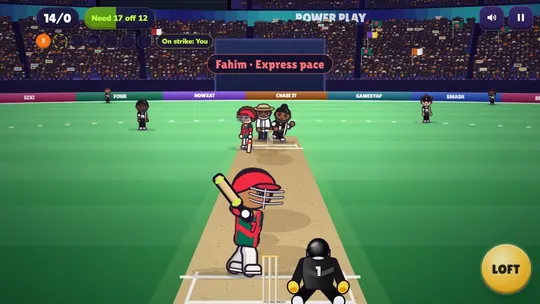
Two things are different from a solo game. There is no Restart in the pause menu, because a restart would not be fair to the others. And the match does not wait: if you leave for a while, your friends keep batting.
How the match ends
Your innings ends when your overs are bowled or your wickets are gone. If you finish first, you wait on the match board and watch the other scores come in. When every player is done, the board shows the final result for everyone:
- Runs each player made
- Wkts: how many wickets they lost
- Balls: how many balls they faced
The most runs wins. If two players made the same runs, the one who lost fewer wickets is ahead, and after that the one who needed fewer balls.
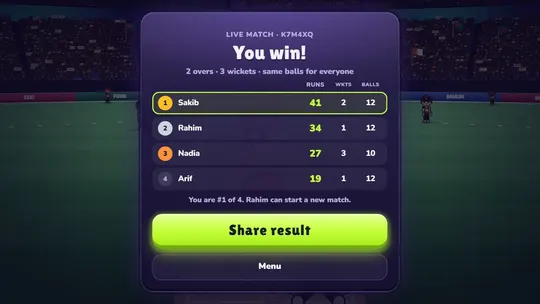
A player who drops out stays on the board with the score they had and a "Left" tag, so one lost connection never spoils the match for the rest. Every match also has a time limit, long enough to bat every ball comfortably.
How to share the result
Tap Share result on the final board. On GamesYap this opens a share sheet with a ready-made score card image: the game's name, the rules of the match, and every player's runs, wickets and balls, with the winner at the top.
- Share image (on phones that support it) sends the picture straight to the app you choose, with a short message and the link.
- Save image downloads the picture so you can post it wherever you like.
- The WhatsApp, Messenger, Telegram and Copy buttons send the match link. The link opens a page with the full score card, and anyone who sees it can start their own match from there.
Playing again
After a match, the host can tap Play again. Everyone returns to the lobby with the same room code, so there is nothing new to share, and the next match uses a fresh set of deliveries. A friend who arrives while a match is running takes a seat, watches the scores, and bats in the next one.
If the host leaves, the room passes to the next player, so the group can carry on.
Tips for winning a live match
- Match your risk to the format. With one wicket, a single mistimed loft ends your match. Play along the ground until you have a score, then open up.
- Use the live scores. If the chip above shows a friend ten runs ahead with an over to go, you know exactly how many big shots you need.
- Do not waste the easy balls. Everyone gets the same deliveries, so the full, straight ones are where matches are won. A four off each of those is worth more than one risky six.
- Stay calm when you finish first. Your score is locked in, and the others still have to make their runs under pressure.
For more on timing, reading the bowler and pacing a chase, see our cricket batting tips.
Who starts the match?
Only the host does. Friends who open your link take a seat and wait, and you see each name appear in the lobby. Nothing begins until you tap Start match, so you can wait for the last friend to arrive. If you would rather share one screen, see our list of free 2 player games on one device, or browse more cricket games.
Live matches do not give GamesYap points, because they are just for fun. Points come from the stages, the daily challenge and the daily match.
FAQ
How many friends can play cricket together online?
A live match room in Willow Smash seats up to four players: the host and three friends. You need at least two players to start. Everyone bats at the same time on their own device, and a friend who arrives during a match joins the next one.
Do my friends need an account or an app?
No. The game runs in the browser on phones, tablets and computers, and a friend can join from the invite link without signing in. Guests can play a few games each day; signing in to a free GamesYap account removes that limit and uses your account name in the room.
Does everyone really face the same balls?
Yes. The room fixes the order of the deliveries before the first ball, so every player gets the same bowlers, the same pace, swing and spin, in the same order. What changes is your timing, which is why the scores still come out differently.
What happens if someone leaves in the middle of a match?
The match carries on. The player who left stays on the board with the runs they had, marked as left, and the others finish their innings as normal. If the host leaves, another player becomes the host and can start the next match.
Can I post the result on social media?
Yes. Tap Share result after the match to get a score card picture with every player's runs, wickets and balls. You can save the image and post it anywhere, share it directly from a phone, or send the match link, which opens the same score card.